Our Vision

To give customers the most compelling IT Support experience possible.

Our Mission

Our mission is simple: make technology an asset for your business not a problem.

Our Values

We strive to make technology integrate seamlessly with your business so your business can grow. As your technology partner, when your business grows ours will grow with you, therefore, we will work hand in hand with you to support your growth.

Our Values

We develop relationship that makes a positive difference in our customers Business.

Our Values

We exibit a strong will to win in the marketplace and in every aspect of our Business

Showing posts with label Tips and Tricks. Show all posts

The Difference Between Advising and Shaming

Imam Ibn Rajab Al-Hanbali's work, "The Difference Between Advising and Shaming," is a profound exploration of the subtle but crucial distinctions between offering constructive #advice and engaging in harmful #criticism. His insights are timeless, providing valuable guidance on how to interact with others in a manner that promotes growth and preserves dignity.


Here are ten key lessons from the book that resonate deeply:

1. Intent Matters: The intention behind advising should always be to help and support the individual. In contrast, shaming aims to belittle and demean. The purpose behind the words greatly influences how they are received.

2. Respect and Dignity: Effective advice honors the recipient's dignity and self-worth. Shaming, however, undermines a person's value and can inflict emotional harm.

3. Constructive vs. Destructive: Advising offers constructive feedback that promotes improvement and growth. Shaming is destructive, often leaving the individual feeling worse without offering a clear path forward.

4. Focus on Behavior, Not Person: Good advice targets specific behaviors or actions and suggests ways to improve them. Shaming attacks the person’s character or identity, making it personal and damaging.

5. Empathy and Understanding: Advising should come from a place of empathy and understanding, taking into account the person's circumstances and feelings. Shaming lacks empathy and often disregards the individual's context.

6. Encouragement vs Discouragement: Advising encourages and motivates the person to do better, offering support and upliftment. Shaming discourages, leading to decreased self-esteem and motivation.

7. Long-term Impact: Advising fosters positive long-term effects, building trust and encouraging continuous improvement. Shaming, on the other hand, can have lasting negative impacts, damaging relationships and causing emotional scars.

8. Promotes Growth: Advising is geared towards helping individuals grow and develop, focusing on their potential and strengths. Shaming stunts growth by fixating on faults and weaknesses.

9. Builds Trust: Consistent, respectful advising builds trust and strengthens relationships. Shaming erodes trust, creating distance and resentment.

10. Leads to Positive Change: When done correctly, advising can lead to meaningful and positive change. Shaming often results in defensiveness, denial, or withdrawal, preventing any constructive outcomes.

These lessons emphasize the importance of delivering #feedback with care, empathy, and respect. In doing so, we uplift others and contribute positively to their personal and professional development, rather than tearing them down.

This distinction is particularly relevant in today's world, where the lines between #constructive #criticism and harmful #shaming can easily blur. By applying the principles outlined by Imam Ibn Rajab Al-Hanbali, we can navigate our interactions more mindfully and contribute to a more supportive and understanding society.

OT Cyber Resilience Summit

 A full day of deep insights at the #OT Cyber Resilience Summit in #Melbourne The energy was palpable, with a powerful gathering of #Australia's top leaders in operational technology security.

The consensus was clear: moving beyond theory to on the ground execution is key. My main takeaways:

🔷 Asset Inventory is Job Zero: But it must be intelligent. Context like system interdependencies and physical location is everything.

🔷 Close the Design Reality Gap: Resilience is built by engaging directly with site operations, not just from design documents.

🔷 Build the Right Structure: Dedicated roles, clear IT/OT frameworks, and hygiene focused KPIs are non negotiable for program maturity.

🔷 Lean on Proven Frameworks: The #SANS 5 Critical Controls and the new #ASD #ACSC "CI Fortify" guide provide an essential blueprint for action.

It was also a pleasure to reconnect with peers and discuss these critical topics.

The need for a principled, holistic approach is what inspired me to write

"The Ethical Guardian of Industry," - which merges advanced security strategies with ethical governance to protect our vital infrastructure available at #Amazon and #Kindle to check out follow this link https://lnkd.in/gxQ3_4Dm

Grateful for the knowledge shared by all and love your feedback on the book!

#OTCyberSecurity #CyberResilience #OperationalTechnology #ICSsecurity #Melbourne #CriticalInfrastructure #ASD #ACSC #SANS #CIFortify #ICS #OT #Scada #Stuxnet #Cyber

Developing and implementing security controls for Azure Active Directory (Azure AD)

Today we will share the list of things you need to consider for Developing and implementing security controls for Azure Active Directory (Azure AD):


1. Identify Azure AD Assets:

   - Create an inventory of all Azure AD assets, including user accounts, groups, applications, service principals, and Azure AD resources.

   - Document the purpose and sensitivity level of each asset.

   - Classify assets based on their importance and criticality to the organization, considering factors such as the data they provide access to or the applications they authenticate.


2. Perform a Risk Assessment:

   - Identify potential threats to your Azure AD environment, such as unauthorized access, identity theft, insider threats, or data breaches.

   - Assess vulnerabilities that could be exploited by conducting a comprehensive assessment of your Azure AD configuration and associated resources.

   - Evaluate the potential impact of each threat and vulnerability on the confidentiality, integrity, and availability of your Azure AD assets.

   - Determine the likelihood of each risk occurring based on historical data, industry trends, and the organization's threat landscape.

   - Prioritize risks based on their potential impact and likelihood, focusing on those with the highest potential risk to your Azure AD environment.


3. Define Security Objectives:

   - Review your organization's overall security strategy and compliance requirements, including any specific Azure AD security requirements.

   - Identify specific security objectives that align with these requirements and the risk assessment findings. Ensure these objectives are measurable and relevant to your organization's needs.

   - Examples of security objectives for Azure AD may include enforcing strong authentication policies, implementing conditional access controls, and protecting privileged accounts.


4. Select Security Controls:

   - Research and review Azure AD security best practices, Azure Security Center recommendations, and Azure AD-specific security frameworks.

   - Identify security controls available in Azure AD that address the identified risks and align with your security objectives.

   - Examples of security controls for Azure AD include enabling multi-factor authentication (MFA), implementing conditional access policies, using Azure AD Privileged Identity Management (PIM), and leveraging Azure AD Identity Protection.

   - Consider using Azure AD security features such as Azure AD Conditional Access, Azure AD Identity Governance, and Azure AD Privileged Identity Management to enhance your security posture.


5. Design Azure AD Security Architecture:

   - Plan the structure of your Azure AD tenant, considering factors such as the number of Azure AD directories, users, groups, and applications required.

   - Define the authentication and access models to be used, such as cloud-only identities, hybrid identities with Azure AD Connect, or federation with external identity providers.

   - Determine the appropriate Azure AD license level and edition based on your organization's needs for advanced security features.

   - Design RBAC roles and assignments for Azure AD resources, ensuring least privilege principles are followed.

   - Establish Azure AD security policies, including password policies, sign-in risk policies, and device compliance policies.


6. Implement Security Controls:

   - Enable multi-factor authentication (MFA) for Azure AD accounts, especially for privileged accounts and accounts with access to sensitive resources.

   - Implement conditional access policies to enforce granular access controls based on user, device, location, and risk factors.

   - Utilize Azure AD Identity Protection to detect and respond to suspicious sign-in activities and risky user behaviors.

   - Leverage Azure AD Privileged Identity Management (PIM) to manage and monitor privileged access to Azure AD and other Azure resources.

   - Regularly review and remediate risky sign-in events, risky users, and vulnerable configurations identified by Azure AD security features.


7. Provide User Training and Awareness:

   - Develop training materials and conduct sessions to educate users about Azure AD security best practices.

   - Train users on the importance of strong passwords, avoiding password reuse, and using MFA for enhanced security.

   - Educate users about recognizing and reporting phishing attempts, suspicious sign-in activities, and other potential security risks.

   - Raise awareness about the importance of safeguarding Azure AD credentials, avoiding sharing of accounts, and promptly reporting any unusual activities or potential security breaches.


8. Establish Incident Response Procedures:

   - Develop an incident response plan specifically for Azure AD security incidents.

   - Define roles and responsibilities for incident response team members, including those responsible for handling Azure AD security incidents.

   - Establish communication protocols and reporting mechanisms to ensure prompt detection, response, and resolution of Azure AD security incidents.

   - Document step-by-step procedures for isolating affected accounts, investigating potential breaches, resetting compromised credentials, and implementing necessary security measures to prevent future incidents.

   - Conduct regular drills and exercises to test the effectiveness of the incident response procedures and identify areas for improvement.


9. Implement Monitoring and Auditing:

   - Enable Azure AD auditing to track and monitor activities such as user sign-ins, application registrations, role assignments, and directory changes.

   - Utilize Azure AD logs and Azure Monitor to collect and analyze security-related events and alerts.

   - Configure alerts and notifications for suspicious activities, such as multiple failed sign-in attempts or privilege escalations.

   - Integrate Azure AD with a Security Information and Event Management (SIEM) system for centralized log management, analysis, and correlation.

   - Regularly review and analyze Azure AD logs and security reports to identify anomalies, detect security incidents, and take appropriate actions to mitigate risks.


10. Regular Assessment and Improvement:

   - Continuously assess the effectiveness of your Azure AD security controls.

   - Stay informed about Azure AD security updates, new security features, and best practices provided by Microsoft.

   - Conduct periodic security assessments and penetration testing to identify vulnerabilities and weaknesses in your Azure AD environment.

   - Monitor Azure Security Center recommendations and implement necessary security improvements.

   - Regularly review and update your Azure AD security controls, policies, and procedures to adapt to emerging threats, industry standards, and regulatory requirements.

Certainly! Here's an expanded and elaborated checklist for developing and implementing security controls in Azure AD and AWS:


Checklist for Azure AD Security:

------------------------------------

| Step                                      | Status 

1 Identify Azure AD Assets                  

  - List all Azure AD resources and services being used, such as users, groups, applications, and roles.      

2 Perform a Risk Assessment                

   - Identify potential threats and vulnerabilities specific to Azure AD.                                     

   - Assess the impact and likelihood of each risk.                                                        

3 Define Security Objectives               

  - Clearly define and document the desired security objectives for Azure AD.                             

  - Ensure objectives align with organizational requirements and compliance standards.                      

4 Select Security Controls                  

   - Research and identify Azure AD-specific security controls provided by Microsoft.                        

  - Choose controls that address identified risks and align with security objectives.                        

5 Design Azure AD Security Architecture    

   - Plan the structure of Azure AD, including directory structure and role assignments.                    

   - Define secure connectivity options and network configurations.                                          

  - Establish data encryption strategies for Azure AD.                                                     

6 Implement Security Controls               

   - Enable multi-factor authentication (MFA) for Azure AD users.                                          

   - Configure strong password policies and password rotation requirements.                                

   - Implement Azure AD Privileged Identity Management (PIM) for access management.                        

   - Enable auditing and logging for Azure AD activities.                                                          

7 Provide User Training and Awareness              

   - Educate users about Azure AD security best practices and potential threats.                            

   - Train users on recognizing and reporting security incidents or suspicious activities.                          

7 Establish Incident Response Procedures    

  - Develop an incident response plan specific to Azure AD security incidents.                                    

  - Define roles and responsibilities for incident response team members.                                          

  - Establish communication protocols and reporting mechanisms for incidents.                                    

9 Implement Monitoring and Auditing                  

  - Enable Azure AD auditing and configure logs for monitoring and analysis.                                       

   - Set up alerts and notifications for suspicious activities or policy violations.                                

   - Integrate Azure AD logs with a centralized logging and monitoring system.                                     

10 Regular Assessment and Improvement             

   - Conduct regular security assessments and vulnerability scans for Azure AD.                                    

  - Stay informed about Azure AD security updates and best practices.                                            

  - Continuously review and update Azure AD security controls and policies.                                     

Remember that security is an ongoing process, and it's important to regularly evaluate and improve the security posture of your Azure AD environment to stay ahead of potential threats and ensure the protection of your organization's identity and access management infrastructure.

Finally here is an excellent blogpost by Mandiant for cloud platform compromise with multiple components that would require investigation

https://www.mandiant.com/resources/blog/cloud-bad-log-configurations


Explore Microsoft Bing Chat


Explore Microsoft Bing Chat is a new feature that allows business users to interact with Microsoft Bing in a conversational way. You can ask Microsoft Bing questions, get insights, create content, and more in natural language. Microsoft Bing responds with informative, intuitive, logical, and actionable responses to help you get things done faster and easier.   In this blog post, we'll show you how to use Discover chat on Microsoft Bing and how it can benefit your work.


 Here are some steps to get started: 

  • Go to https://www.bing.com and click  the chat icon in the lower right corner of the screen. 

  •  Select your preferred language and mode from the options.You can switch between Balanced, Creative, and Precision modes according to your needs and preferences. 

  • Type or speak your request or message to Microsoft Bing. 

  • You can use voice input by clicking  the microphone icon next to the text box. 

  • Microsoft Bing will respond with  relevant and engaging feedback, which can include web results, images, tables, lists, code blocks, LaTex expressions, and more. You can also see suggestions for the next user  at the bottom of the chat box.  

  • You can continue the conversation by following the suggestions or by typing or speaking your own request or message. You can also click on the link or reference in the Microsoft Bing response to explore more information.


Chat on Microsoft Bing is a feature that allows you to interact with Bing in a conversational way. You can ask questions, get information, and even generate content using natural language. Chat on Microsoft Bing has three main components:

- Chat: This is where you can type your messages and see Bing's responses. You can also switch between different modes, such as Balanced, Creative, and Precise, to get different types of responses from Bing.


- Compose: This is where you can use Bing's creativity and intelligence to help you write or improve your own content. You can ask Bing to generate poems, stories, code, summaries, lyrics, and more. You can also ask Bing to rewrite, optimize, or enhance your content.


- Insights: This is where you can see additional information and details related to your chat messages. You can see web search results, question answering results, advertisements, and suggestions for the next user turn.


Microsoft Bing chat discovery is designed to help you find answers, create content, and complete tasks naturally and intuitively. Whether you need to research a topic, write a report, create a presentation, or just have  fun, you can use the Explore chat on Microsoft Bing to boost your productivity and creativity. Try it  today and let us know what you think.

Ransomware Response Plan

Here are the key steps for an effective response plan: 

 1. Don't Panic: 
- Stay calm and act purposefully when targeted by ransomware. 
- Seek help from security vendors or report the incident to your insurance company. 

 2. Isolate Your Systems and Stop the Spread:
 - Identify the range of the attack and implement network-level blocks or device-level isolation.
 - Utilize endpoint detection and response (EDR) technology to block the attack at the process level.

 3. Identify the Ransomware Variant: 
- Determine the specific strain of ransomware to understand its behavior and possible decryption options. 

 4. Identify Initial Access:
 - Determine the entry point of the attack to close security holes
. - Consult digital forensics teams and incident response experts if needed.

 5. Identify All Infected Systems and Accounts (Scope): - 
Identify active malware and persistent elements in systems communicating with the command-and-control server.

 6. Determine if Data Was Exfiltrated: 
- Look for signs of data exfiltration, such as large data transfers or unusual communications. 

 7. Locate Your Backups and Determine Integrity: -
 Ensure backup technology was not affected and scan backups for integrity.

 8. Sanitize Systems or Create New Builds: 
- Remove malware and incidents of persistence, or consider creating new, clean systems
. - Implement appropriate security controls to prevent reinfection.

 9. Report the Incident: 
- Report the incident and determine if law enforcement should be involved. Consider legal obligations regarding regulated data.

 10. Paying the Ransom? 
- Law enforcement advises against paying the ransom

. 11. Conduct a Post-Incident Review: 
- Evaluate the ransomware response and identify areas for improvement. 
- Simulate attack scenarios and consider proactive playbook building. 
- Consider external services if IT or security team staffing is limited.

Chat GPT Alternatives


OpenAI’s Chat GPT offers the reality of high-performing AI chatbots. The purpose of these chatbots is to communicate with users in a conversational manner. And being open source, users can suggest any improvements. 

As a result, this technology has taken the internet by storm. Millions of users are using it, but there have been some issues with this chatbot. Particularly when Chat GPT is at capacity and users cannot access it.

Therefore it’s good to know about some quality Chat GPT alternatives. Here are some options that can help you to level up with AI more easily if Chat GPT is not working for you. Some are more complex, and others far more accessible, while some are free and others have pricing structures too.

Chat GPT Alternatives – examples


Bloom

Blo Bloom om is an open-source multi-language model. This Chat GPT alternative added 384 graphic cards with a total of 80 GB of memory to 176 billion parameters to train – 1 billion more than the GPT 3 model.


Chinchilla

DeepMind researchers developed a project named Chinchilla, which is more intimately known as the GPT3 killer.

It’s an optimal computing model that has 70 billion protocols. It has four times more data than Gopher, also developed by DeepMind. Chinchilla is reportedly one of the best options for downstream evaluation tasks (also known as the task a user wants to solve).

It’s a top-notch AI-based writing tool and has educational data on history. Therefore, it can create articles with proper style and structure minus grammatical errors. Without human help, it can produce a useful and readable article in less than an hour.


Megatron-Turing Natural Language Generation

Microsoft and Nvidia made a language model with 530 billion parameters, making it bigger and better than others available. Called Megatron-Turing Natural Language Generation, it is one of the best English language models – trained on SuperPOD by the Selene supercomputer.


Jasper

Jasper AI is a writing model previously known as Jarvis. Jasper has bought other writing tools, such as Shortly AI and Headline, and these will be integrated into Jasper in the coming years.

You can select a topic and fill out the relevant form, and Jasper will create the article for you according to the instructions you have entered. Jasper has a 5-day free trial, with its ‘starter’ plan starting at $24 per month.


Replika

Replika is pretty close to Chat GPT in conversational uses, and you can have similar conversations here, too. It can talk and give text replies at any time without delay. It is primarily an AI chatbot you can use to discuss general topics like love and life, just like you do with friends.


ELSA

ELSA stands for English Language Speech Assistant, a language learning app. It is available on Android and iOS platforms to download. The app analyzes users’ speech and helps them learn and understand the language.

There are more Chat GPT alternatives too, some with more specific applications than others. Here’s a list of a few, including those mentioned above.


ELSA has free and Pro options and Pro costs $11.99 for one month, $8.66p/m for three months, and $6.25p/m for one-year access.


Final thoughts

We have discussed some of the top alternatives of Chat GPT above. You can perform a wide range of functions using these alternatives, and there are others too – including Rytr, Socratic and Faceapp – which uses AI modeling on imagery.


So, when Chat GPT is not working, you’re not sure about the price or if you require another specific application that is more easily served by an alternative, you can use one of these instead.

Google Hacking :-

Basic Operators:-
1) And (+) :- This operator is used to include multiple terms in a query which is to be searched in google.
example:- if we type "hacker+yahoo+science" in google search box and click search, it will reveal the results something which are related to all the three words simultaneously i.e. hacker, yahoo and science.

2 ) OR (|) :- The OR operator, represented by symbol( | ) or simply the word OR in uppercase letters, instructs google to locate either one term or another term in a query.

3) NOT :- It is opposite of AND operator, a NOT operator excludes a word from search.
example:- If we want to search websites containing the terms google and hacking but not security then we enter the query like "google+hacking" NOT "security".


Advanced Operators:-
1) Intitle :- This operator searches within the title tags.
examples:- intitle:hacking returns all pages that have the string "hacking" in their title.

intitle:"index of" returns all pages that have string "index of" in their title.

Companion operator:- "allintitle".


2) Inurl :- Returns all matches, where url of the pages contains given word.
example:- inurl:admin returns all matches, where url of searched pages must contains the word "admin".

Companion operator:- "allinurl".


3) Site :- This operator narrows search to specific website. It will search results only from given domain. Can be used to carry out information gathering on specific domain.
example:- site:www.microsoft.com will find results only from the domain www.microsoft.com

4) Link :- This operator allows you to search for pages that links to given website.
example:- link:www.microsoft.com
Here, each of the searched result contains asp links to www.microsoft.com

5) Info :- This operator shows summary information for a site and provides links to other google searches that might pertain to that site.
example:- info:www.yahoo.com

6) Define :- This operator shows definition for any term.
example:- define:security
It gives various definitions for the word "security" in different manner from all over the world.

7) Filetype :- This operator allows us to search specific files on the internet. The supported file types can be pdf, xls, ppt, doc, txt, asp, swf, rtf, etc..
example:- If you want to search for all text documents presented on domain www.microsoft.com then we enter the query something like following.
"inurl:www.microsoft.com filetype:txt"


POPULAR SEARCH:
Google Search :- "Active Webcam Page" inurl:8080 Description- Active WebCam is a shareware program for capturing and sharing the video streams from a lot of video devices. Known bugs: directory traversal and cross site scripting.

Google Search :- "delete entries" inurl:admin/delete.asp Description- AspJar contains a flaw that may allow a malicious user to delete arbitrary messages. The issue is triggered when the authentication method is bypassed and /admin/delete.asp is accessed directly. It is possible that the flaw may allow a malicious user to delete messages resulting in a loss of integrity.

Google Search :- "phone * * *" "address *" "e-mail" intitle:"curriculum vitae"
Description- This search gives hundreds of existing curriculum vitae with names and address. An attacker could steal identity if there is an SSN in the document.

Google Search :- intitle:"index of" finance.xls Description- Secret financial spreadsheets 'finance.xls' or 'finances.xls' of companies may revealed by this query.

Google Search :- intitle:"index.of" robots.txt Description- The robots.txt file contains "rules" about where web spiders are allowed (and NOT allowed) to look in a website's directory structure. Without over-complicating things, this means that the robots.txt file gives a mini-roadmap of what's somewhat public and what's considered more private on a web site. Have a look at the robots.txt file itself, it contains interesting stuff. However, don't forget to check out the other files in these directories since they are usually at the top directory level of the web server!

Google Search :- intitle:index.of.admin Description- Locate "admin" directories that are accessible from directory listings.

Google Search :- inurl:"nph-proxy.cgi" "start browsing" Description- Returns lots of proxy servers that protects your identity online.

DNS Logs Anomaly Hunting Checklist for Security and SOC Analyst


DNS Logs Anomaly Hunting Checklist for SOC Analyst


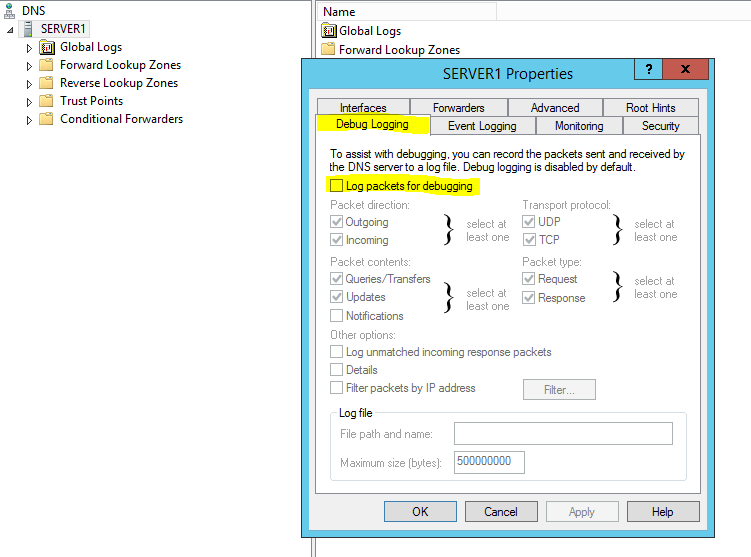
Check for the hosts with a high volume of uncommon record types (TXT, NULL, CNAME, etc.)


• Command and control channels may utilize specific DNS records such as ( TXT and CNAME requests ) to execute malware.


• Explore Top Level Domains, TLDs (.xyz, .me, .biz, etc ), and TLDs for geographical regions in which your organization does not regularly operate.


• The proliferation of TLDs has made it easier for attackers to continually add new domains to their infrastructure to evade threat intel lists, as well as register doppelganger domains for common websites.


• Inbound/ Outbound Requests for TLDs of geographical regions outside of your organization’s point of presence should be considered suspicious and reviewed, especially regions synonymous with cybercrime and anonymization.


• Aggregate and Filter on DNS application logs with the response code NXDOMAIN (domain does not exist) to review hosts seen with a high volume of DNS resolution failures.


• There are many benign reasons for failed DNS queries; however, the abnormal volume can be a strong indicator of possible threat activity. For example, malware utilizing Domain generation algorithms ( DGAs ) will cycle through multiple generated domains until a valid reply is received. Since most of the domains requested will not exist, it will generate a high volume of NXDOMAIN responses. In addition, abnormal NXDOMAIN volume could highlight hosts requesting malicious domains that are no longer active.


• Look for hosts with high DNS request volume for multiple subdomains of a single parent domain.


• A common method of communicating data is by including it in the query string itself in place of the subdomain (commonly encoded using Base64). Identifying requests of multiple suspicious subdomains for a specific domain could help to highlight this method of communication.


• Identify suspicious requests by reviewing queries of domains that are abnormally long, or domains with a high level of entropy.


• Hunting abnormal long queries with a high amount could help identify encoded data hidden in query strings as well as evidence of DGA domains.


• Review endpoints process names for any unusually named processes or processes that are not regularly seen generating logon requests.


• Attackers can simply register new domains to evade detection by threat intel lists. Identifying newly registered domains could help to easily identify suspicious activity.


• DNS fluxing is a technique used by attackers to hide an actual phishing or malware domain behind constantly changing compromised hosts (IP) which are acting as proxies. To accomplish this, the Time to Live (TTL) for DNS is set very low (close to 5 min) so that the changes made in DNS will reflect quickly over the internet. Because it is constantly changing, this makes it hard to identify, and take down the actual source.DNS query for a domain, having a TTL less than 5-10 mins, should be one way to hunt. Then getting different IP addresses for the same domain is also a way to hunt.


• Allowed Traffic on Port 53 Inbound Transition Control Protocol (TCP), zone transfer and should only be allowed between primary and secondary DNS servers. If zone transfer happens with an external IP/Domain which is considered as a high alert.


• DNS Should Not Query Unusual Destinations, this often indicates the potentially malicious traffic.

Kerberoasting Attack and Detection

Kerberoasting 

is a common attack used by malicious actors once access is gained to a organization's internal network and a domain account is compromised. Kerberoasting allows an attacker to elevate their privileges by gaining access to passwords for service accounts on the domain.


Key Points

• Using Kerberoasting  attacker extracts service account credential hashes from Active Directory for offline cracking by exploiting a combination of weak encryption and poor service account password.  

  • Kerberoasting is effective because an attacker does not require domain administrator credentials to pull off this attack and can extract service account credential hashes without sending packets to the target.


Detecting Kerbaroasting:

  • Event ID: 4768 (Kerberos TGS Request) The Account Domain field is DOMAIN FQDN when it should be DOMAIN.
  • Event ID “4769” with the vulnerable encryption RC4 “0x17” and “0x18” types in Kerberoasting and ticket option 0x40810000.


Elements of a Kerberoasting Attack


Here is how a Kerberoasting attack works in practice:


  • To begin with, an attacker compromises the account of a domain user. The user need not have elevated or “administrator” privileges. The attacker authenticates to the domain.
 
  • When the malicious  user is authenticated, they receive a ticket granting ticket (TGT) from the Kerberos key distribution center (KDC) that is signed by its KRBTGT service account in Active Directory.
 
  • Next, the malicious actor requests a service ticket for the service they wish to compromise. The domain controller will retrieve the permissions out of the Active Directory database and create a TGS ticket, encrypting it with the service’s password. As a result, only the service and the domain controller are capable of decrypting the ticket since those are the only two entities who share the secret.
 
  • The domain controller provides the user with the service ticket that is then presented to the service, which will decrypt it and determine whether the user has been granted permission to access the service. At this point, an attacker may extract the ticket from system memory, and crack it offline.
 
  • For password cracking, tools such as Impacket, PowerSploit and Empire contain features that automate the process: requesting service tickets and returning crackable ticket hashes in formats suitable for submission to cracking tools such as John the Ripper and Hashcat, which will pry plaintext credentials from vulnerable hashes.


Finding Golden and Silver Tickets


Purpose: Identify suspicious TGT (Golden) and TGS (Silver) tickets by comparing the MaxTicketAge from the domain policy to the difference in the StartTime and EndTime of the cached authentication ticket.

Data Required : Remote Access to collect susicious tickets OR

Schedule task to write possible bad tickets to application event log for log/SIEM review

Collection Considerations : Consider running local scripts and collecting the application event log rather than a scan to reduce noise See here

Analysis Techniques:Comparative time analysis of domain policy vs cached tickets


Identify suspicious TGT (Golden) and TGS (Silver) tickets  


  • Event ID: 4624 (Account Logon)
  • The Account Domain field is DOMAIN FQDN when it should be DOMAIN.
  • Event ID: 4672 (Admin Logon)
  • Account Domain is blank & should be DOMAIN.
  • Event ID: 4768 (Kerberos TGS Request)
  • The Account Domain field is DOMAIN FQDN when it should be DOMAIN.
  • The Account Domain field is blank when it should be DOMAIN
  •  The Account Domain field is DOMAIN FQDN when it should be DOMAIN.
  •  Account Name is a different account from the Security ID.


BloodHound

  • BloodHound is an Active Directory (AD) reconnaissance tool.
  • BloodHound outputs results as JSON files
  • BloodHound can collect information about the following objects (users, computers, groups, gpos)
  • BloodHound can archive collected a ZIP file
  • Hunt for Suspicious Process execution via Services.exe
  • Hunt for Suspicious Process Injection

Hacking , ATT&CK phase , kill chain and incident response phases

There are some common steps used by industry and most commons in Cyber field are listed below.

 HACKING Methodology (Steps) 

Footprinting (whois,nslookup) » 

Scanning (Nmap,fping) » 

Enumeration (dumpACL, showmount, Iegion, rpcinfo » 

Gaining Access(Tcpdump) »

Escalating Privilege(John the ripper, getadmin) »

Pilfering (Rhosts. userdata, configtile. registry) » 

Covering Tracks (zap, rootkits) »

Creating Backdoors (corn, at, startup folder, keylogger, rdp) »

Denial Of Service (synk4, ping Of death). 


MITRE ATT&CK:

Reconnaissance» 

Resource Development » 

Initial Access» Execution »

 Persistence »

 Privilege Escalation » 

Defense Evasion» 

Credential Access » 

Discovery »

 Lateral Movement »

 Collection »

Command and Control »

 Exfiltration»

 Impact.


CYBER KILL CHAN: 

Reconnaissance» 

Weaponization»

Delivery » 

Exploitation »

Installation »

Command and Control » 

Action and Objective .


Incident Response: 

Identify »  Protect »  Detect »  Respond»  Recover. 

SANS Incident Response:

 Preparation »  Identification»  Containment »  Eradication »  Recovery »  Lesson Learned

Web shells Detectting and Hardening servers against webshell


web shells and its Challenges in detecting 


Web shells can be built using any of several languages that are popular with web applications. Within each language, there are several means of executing arbitrary commands and there are multiple means for arbitrary attacker input. Attackers can also hide instructions in the user agent string or any of the parameters that get passed during a web server/client exchange.
 
When analyzing script, it is important to leverage contextual clues. For example, a scheduled task called “Update Google” that downloads and runs code from a suspicious website should be inspected more closely.

With web shells, analyzing context can be a challenge because the context is not clear until the shell is used. In the following code, the most useful clues are “system” and “cat /etc/passwd”, but they do not appear until the attacker interacts with the web shell:

Another challenge in detecting web shells is uncovering intent. A harmless-seeming script can be malicious depending on intent. But when attackers can upload arbitrary input files in the web directory, then they can upload a full-featured web shell that allows arbitrary code execution—which some very simple web shells do.

These file-upload web shells are simple, lightweight, and easily overlooked because they cannot execute attacker commands on their own. Instead, they can only upload files, such as full-featured web shells, onto web servers. Because of their simplicity, they are difficult to detect and can be dismissed as benign, and so they are often used by attackers for persistence or for early stages of exploitation.

Finally, attackers are known to hide web shells in non-executable file formats, such as media files. Web servers configured to execute server-side code create additional challenges for detecting web shells, because on a web server, a media file is scanned for server-side execution instructions. Attackers can hide web shell scripts within a photo and upload it to a web server. When this file is loaded and analyzed on a workstation, the photo is harmless. But when a web browser asks a server for this file, malicious code executes server side.

These challenges in detecting web shells contribute to their increasing popularity as an attack tool. We constantly monitor how these evasive threats are utilized in cyber attacks, and we continue to improve protections


Web shell: Finding Web Shells

Purpose: Identify web shells (stand-alone|injected)

Data Required : Web server logs (apache, IIS, etc.)

Collection Considerations : Collect from all webservers, and ensure that parameters are collected.

POST data should be collected.

• For apache consider using mod_security or mod_dumpio

• For IIS use Failed Request Tracing / Custom Logging

Analysis Techniques:

Look for parameters passed to image files (e.g., /bad.png?zz=ls


Web logs things to notice

    • User-Agent is rare

    • User-Agent is new

    • Domain is rare

    • Domain is new

    • High frequency of http connections

    • URI is same

    • URI varies but length is constant.

    • Domain varies but length is constant

    • Missing referrer

    • Missing or same referrer to multiple uri’s on single dest.


Endpoint detection strategies:

• Look for creation of processes whose parent is the webserver (e.g., apache, w3wp.exe); these will come from functions like:

○ PHP functions like exec(), shell_exec(), etc.

○ asp(.net) functions like eval(), bind(), etc.)

• Looking for file additions or file changes (if you have a change management process and schedule to easily differentiate 'known good') -- (using something like inotify on linux (or FileSystemWatcher in .NET), to monitor the webroot folder(s) recursively)


Other Notable things:

IIS instance (w3wp.exe) running commands like ‘net’, ‘whoami’, ‘dir’, ‘cmd.exe’, or ‘query’, to name a few, is typically a strong early indicator of web shell activity.


Look for suspicious process that IIS worker process (w3wp.exe), Apache HTTP server processes (httpd.exe, visualsvnserver.exe), etc. do not typically initiate (e.g., cmd.exe and powershell.exe)


Look for suspicious web shell execution, this can identify processes that are associated with remote execution and reconnaissance activity (example: “arp”, “certutil”, “cmd”, “echo”, “ipconfig”, “gpresult”, “hostname”, “net”, “netstat”, “nltest”, “nslookup”, “ping”, “powershell”, “psexec”, “qwinsta”, “route”, “systeminfo”, “tasklist”, “wget”, “whoami”, “wmic”, etc.)


lolbas:

    - rundll32.exe

    - dllhost.exe

    tools:

    - net.exe

    - powershell.exe

    - ipconfig.exe

    - CobaltStrike

    - BloodHound

    - nslookup.exe


execution:

        - "T1055.012 - Process Injection: Process Hollowing"

    - behavior: RUNDLL32 created ~20 instances of DLLHOST without command-line arguments.

      id: 1669ecb0-3a8a-4858-9efd-23e5c01ad643

      type: Process Created

      cmdLine:

      - C:\\Windows\\System32\\dllhost.exe

      process: C:\\Windows\\System32\\dllhost.exe

      parentProcess: C:\\Windows\\System32\\rundll32.exe


Attackers need to execute tools. Look at Windows Event ID's 4688/592. Stack and look for outliers. Group by execution time and user."


Hardening servers against web shells

A single web shell allowing attackers to remotely run commands on a server can have far-reaching consequences. With script-based malware, however, everything eventually funnels to a few natural chokepoints, such as cmd.exe, powershell.exe, and cscript.exe. As with most attack vectors, prevention is critical.

Organizations can harden systems against web shell attacks by taking these preventive steps:

  • Identify and remediate vulnerabilities or misconfigurations in web applications and web servers. Use Threat and Vulnerability Management to discover and fix these weaknesses. Deploy the latest security updates as soon as they become available.
 
  • Implement proper segmentation of your perimeter network, such that a compromised web server does not lead to the compromise of the enterprise network.
 
  • Enable antivirus protection on web servers. Turn on cloud-delivered protection to get the latest defenses against new and emerging threats. Users should only be able to upload files in directories that can be scanned by antivirus and configured to not allow server-side scripting or execution.
 
  • Audit and review logs from web servers frequently. Be aware of all systems you expose directly to the internet.
 
  • Utilize the Windows Defender Firewall, intrusion prevention devices, and your network firewall to prevent command-and-control server communication among endpoints whenever possible, limiting lateral movement, as well as other attack activities.
 
  • Check your perimeter firewall and proxy to restrict unnecessary access to services, including access to services through non-standard ports.
 
  • Practice good credential hygiene. Limit the use of accounts with local or domain admin level privileges.

Twitter Facebook Favorites More