Our Vision

To give customers the most compelling IT Support experience possible.

Our Mission

Our mission is simple: make technology an asset for your business not a problem.

Our Values

We strive to make technology integrate seamlessly with your business so your business can grow. As your technology partner, when your business grows ours will grow with you, therefore, we will work hand in hand with you to support your growth.

Our Values

We develop relationship that makes a positive difference in our customers Business.

Our Values

We exibit a strong will to win in the marketplace and in every aspect of our Business

Showing posts with label viruses. Show all posts

The Lazarus Heist

 The 2016 #Bangladesh #Bank #cyber heist, where $81 million was stolen, ranks among the most significant cybercrimes. #Hackers infiltrated Bangladesh Bank’s #SWIFT #network and initiated unauthorized transfers from its account at the #Federal Reserve #Bank of New York. The stolen funds were dispersed through accounts in the #Philippines, where they were laundered via casinos with weak AML (anti-money laundering) regulations.


The #Lazarus Group, a #North #Korean state-sponsored #hacking syndicate, was identified as the primary perpetrator. They used custom #malware to gain access, bypassing inadequate security controls within #Bangladesh #Bank. Investigators, including those from #India, found that the attackers exploited weak network segmentation and #monitoring within the bank. According to Geoff White  "The Lazarus Heist"(pp. 109-116), the malware code used was highly advanced, further complicating detection and response.

The incident revealed critical issues in Bangladesh Bank’s #infrastructure, including outdated systems and lack of incident response planning, which delayed containment efforts. Adding to the suspicion, a fire broke out post-incident in a specific #office area, destroying potential evidence and hindering investigations. https://lnkd.in/gNctf6TK

This fire, combined with reports of potential data mishandling by the bank’s IT department, raised doubts about the transparency of the bank’s response.

International organizations, including #INTERPOL and the #FBI, were involved in the probe, linking the heist to #North Korea’s efforts to bypass global sanctions. The heist pressured SWIFT to improve its security standards and forced global financial institutions to reassess their #cybersecurity practices, particularly in high-stakes interbank #communication.

The heist underscores the need for robust #cybersecurity, stronger internal controls, and improved global AML regulations. The case remains a pivotal example of how cybercriminals can #exploit financial systems, emphasizing the need for vigilant, coordinated international cybersecurity efforts.

Defend your Microsoft Defender now

Defend your #Microsoft #Defender now

The #Microsoft #Defender Triad Your SOC Can't Afford to Ignore

When a disgruntled researcher (Nightmare-Eclipse/Chaotic Eclipse) drops three coordinated tools on GitHub in 18 days #BlueHammer, #RedSun, and #UnDefend the industry must pay attention.

The Three-Pronged Attack:

🔵 #BlueHammer (CVE-2026-33825, CVSS 7.8) Patched. A local privilege escalation (LPE) flaw chaining TOCTOU and path confusion to extract NTLM hashes and escalate to SYSTEM. Exploited in the wild since April 10.

🔴 #RedSun (Unpatched)  A privilege escalation with ≈100% reliability on fully updated Windows 10, 11, and Server 2019+. It abuses Defender’s "cloud tag" file restoration to overwrite a system binary (TieringEngineService.exe) and executes it as SYSTEM.

🔻 #UnDefend (Unpatched)  A denial-of-service tool that, from a standard user account, blocks Defender signature updates (passive) or disables the engine entirely (aggressive), leaving systems blind.

What This Means for Business:

Huntress has confirmed all three techniques are already weaponized in the wild. With #RedSun and #UnDefend unpatched, you have no official fix. A single initial access (phishing, stolen creds) can lead to:

· Unprivileged user → Full SYSTEM access
· NTLM hash extraction and lateral movement
· Defender blind spot for follow-on payloads

What This Means for the Attacker:

This isn't just a bug report, it's a complete offensive kill chain. Escalate (BlueHammer/RedSun), execute (SYSTEM payload), and blind detection (UnDefend). No memory corruption, no kernel exploit, just logic flaws in Defender's own trusted operations.

Your Action Plan:

· Hunt for indicators: Unexpected Cloud Files sync registrations, NTFS junction/reparse point creation, VSS snapshot enumeration from user-space processes

· Monitor privileged writes to C:\Windows\System32\TieringEngineService.exe

· Consider disabling Cloud-delivered protection as a temporary mitigation for RedSun

· Assume compromise if unpatched systems have had local code execution exposure

Run defender XDR queries published by Steven Lim https://lnkd.in/gFR5bFRz

💡 Bigger picture: This episode underscores the fragility of supply chain trust and the catastrophic consequences when vulnerability disclosure breaks down. Microsoft credited other researchers for CVE-2026-33825—not Nightmare-Eclipse—fueling an already volatile situation.

Zero-days are inevitable. Having three dropped in rapid succession by the same researcher, with two remaining unpatched, is a wake-up call for proactive threat hunting.

Stay vigilant. 🛡️

#cybersecurity #infosec #Microsoft #ZeroDay #WindowsDefender #PrivilegeEscalation #BlueHammer #RedSun #UnDefend #ThreatIntelligence

Critical EDR threats - RoguePlanet,Silent Choke

 🔻 Three critical #EDR threats dropped in the last couple of weeks that fundamentally break how we think about endpoint security.

If your strategy relies on "having #EDR installed and we are secure," know this below tools ready to break in your defence.

below are quick technical summary of the tools and techniques full details technical link in the comment section.

1. #EDRChoker (Silent Choke)
Throttles EDR outbound bandwidth to 8 bits/sec using Windows QoS.

How: Targets pacer.sys below WFP. TLS handshakes time out.
Result: EDR goes blind. Agent looks online. SOC sees nothing.

2. #AI Evasion Malware Lab Factory The attacker had not written a clever new piece of malware. They had built a factory. Wired into the Cursor AI coding IDE and driven by multiple Anthropic Claude Opus 4.5 agents, the setup mass-produced and tested EDR-evasion payloads.
Claude Opus 4.5 mass-produced 70+ evasion techniques against EDRs, #CrowdStrike, #Defender.

Reality is #AI hallucinated success rates, but productivity multiplier is real. One operator now does what took a team of Hackers.

3. #RoguePlanet  -NEW RoguePlanet Windows Defender Vulnerability.
Race condition in #Microsoft #Defender → Local Privilege Escalation to SYSTEM.

Impact: Works on fully patched Windows 10/11 (June 2026). Researcher warns: "More Defender vulns coming."

#SOC Actions to catch this tools
#EDRChoker
· Run Get-NetQosPolicy. Monitor Event IDs 4001, 4002.
· Alert on "Sensor Health Status Change."

#AI Factory:
· Hunt \Users\Documents\test\ or \build\out\ executables.
· Alert on >25 LDAP queries in 10 mins.
· Block api.telegram.org & *.workers.dev from workstations.

#RoguePlanet
· Alert on MsMpEng.exe spawning cmd.exe or powershell.exe with #SYSTEM token.
· Disable VHD/VHDX auto-mounting via GPO.
· Prioritize application allowlisting (blocks the exploit entirely).

💼 For Management

1. Tamper Protection: #Sensor dropout must trigger a paged alert.
2. Don't Trust #Defender Alone: More vulns unreleased. Layer controls.
3. Test Your Config: Haven't tested in 30 days? Assume failure.
4. #AI Multiplier is Here: Move from signatures to fundamentals: MFA, patching, allowlisting, segmentation.

Bottom Line is attackers now build factories to bypass your stack, choke telemetry, and weaponize Defender against you. Defend accordingly.

#cybersecurity #EDR #infosec #AI #ThreatHunting #BlueTeam #CISO #MicrosoftDefender #ZeroDay

Recommendations for Mitigating BianLian Ransomware Group attack


To enhance your organization's cybersecurity posture and counter the activities of the BianLian Ransomware Group, we advise implementing the following mitigations. These measures align with the Cross-Sector Cybersecurity Performance Goals (CPGs) developed by CISA and NIST (the National Institute of Standards and Technology). The CPGs outline a minimum set of practices and protections recommended for all organizations, based on existing cybersecurity frameworks and guidance that target common and impactful threats and tactics.


1. Reduce the risk of malicious actors using remote access tools by taking the following actions:

   - Conduct an audit of remote access tools on your network to identify authorized and currently used software.

   - Review logs to detect abnormal use of portable executable programs running remote access software.

   - Utilize security software capable of detecting instances where remote access software is loaded only in memory.

   - Allow authorized remote access solutions strictly from within your network, using approved methods like virtual private networks (VPNs) or virtual desktop interfaces (VDIs).

   - Block inbound and outbound connections on common remote access software ports and protocols at the network perimeter.

   - Implement application controls to manage and control the execution of software, including allowing only approved remote access programs.

   - Employ application allowlisting to prevent the installation and execution of unauthorized remote access software, including portable versions that evade traditional antivirus solutions.


For additional guidance, refer to the NSA Cybersecurity Information Sheet on enforcing signed software execution policies.


2. Strictly limit the use of Remote Desktop Protocol (RDP) and other remote desktop services. If RDP is necessary, adhere to best practices such as:

   - Conduct network audits to identify systems using RDP.

   - Close unused RDP ports.

   - Enforce account lockouts after a specified number of failed login attempts.

   - Implement phishing-resistant multifactor authentication (MFA).

   - Log RDP login attempts.

   - Disable command-line and scripting activities and permissions.

   - Restrict the use of PowerShell to specific users who manage the network or Windows operating systems.

   - Keep PowerShell updated to the latest version and uninstall older versions.

   - Enable enhanced PowerShell logging to capture valuable data for monitoring and incident response.


3. Review domain controllers, servers, workstations, and active directories to identify any new or unrecognized accounts. Audit user accounts with administrative privileges and configure access controls based on the principle of least privilege.


4. Reduce the risk of credential compromise by implementing the following measures:

   - Place domain admin accounts in the protected users' group to prevent local caching of password hashes.

   - Implement Credential Guard for Windows 10 and Server 2016, or enable Protected Process Light for Local Security Authority (LSA) on Windows Server 2012R2.

   - Avoid storing plaintext credentials in scripts.

   - Implement time-based access for admin-level accounts using methods like Just-in-Time (JIT) access provisioning.


In addition to the above recommendations, the FBI, CISA, and ACSC suggest the following mitigations to limit the adversarial use of system and network discovery techniques and reduce the impact and risk of ransomware or data extortion:


1. Develop and maintain a recovery plan that includes multiple copies of sensitive data and servers stored in physically separate, segmented, and secure locations. Maintain offline backups of data, following the 3-2-1 backup strategy (three copies, two media types, one off-site).


2. Ensure that all accounts with password logins comply with NIST standards for password policies. Use longer passwords, store passwords in hashed format using recognized password managers, add password user "salts" to shared login credentials, avoid password reuse, implement multiple failed login attempt account lockouts, disable password hints, and limit

Chat GPT Alternatives


OpenAI’s Chat GPT offers the reality of high-performing AI chatbots. The purpose of these chatbots is to communicate with users in a conversational manner. And being open source, users can suggest any improvements. 

As a result, this technology has taken the internet by storm. Millions of users are using it, but there have been some issues with this chatbot. Particularly when Chat GPT is at capacity and users cannot access it.

Therefore it’s good to know about some quality Chat GPT alternatives. Here are some options that can help you to level up with AI more easily if Chat GPT is not working for you. Some are more complex, and others far more accessible, while some are free and others have pricing structures too.

Chat GPT Alternatives – examples


Bloom

Blo Bloom om is an open-source multi-language model. This Chat GPT alternative added 384 graphic cards with a total of 80 GB of memory to 176 billion parameters to train – 1 billion more than the GPT 3 model.


Chinchilla

DeepMind researchers developed a project named Chinchilla, which is more intimately known as the GPT3 killer.

It’s an optimal computing model that has 70 billion protocols. It has four times more data than Gopher, also developed by DeepMind. Chinchilla is reportedly one of the best options for downstream evaluation tasks (also known as the task a user wants to solve).

It’s a top-notch AI-based writing tool and has educational data on history. Therefore, it can create articles with proper style and structure minus grammatical errors. Without human help, it can produce a useful and readable article in less than an hour.


Megatron-Turing Natural Language Generation

Microsoft and Nvidia made a language model with 530 billion parameters, making it bigger and better than others available. Called Megatron-Turing Natural Language Generation, it is one of the best English language models – trained on SuperPOD by the Selene supercomputer.


Jasper

Jasper AI is a writing model previously known as Jarvis. Jasper has bought other writing tools, such as Shortly AI and Headline, and these will be integrated into Jasper in the coming years.

You can select a topic and fill out the relevant form, and Jasper will create the article for you according to the instructions you have entered. Jasper has a 5-day free trial, with its ‘starter’ plan starting at $24 per month.


Replika

Replika is pretty close to Chat GPT in conversational uses, and you can have similar conversations here, too. It can talk and give text replies at any time without delay. It is primarily an AI chatbot you can use to discuss general topics like love and life, just like you do with friends.


ELSA

ELSA stands for English Language Speech Assistant, a language learning app. It is available on Android and iOS platforms to download. The app analyzes users’ speech and helps them learn and understand the language.

There are more Chat GPT alternatives too, some with more specific applications than others. Here’s a list of a few, including those mentioned above.


ELSA has free and Pro options and Pro costs $11.99 for one month, $8.66p/m for three months, and $6.25p/m for one-year access.


Final thoughts

We have discussed some of the top alternatives of Chat GPT above. You can perform a wide range of functions using these alternatives, and there are others too – including Rytr, Socratic and Faceapp – which uses AI modeling on imagery.


So, when Chat GPT is not working, you’re not sure about the price or if you require another specific application that is more easily served by an alternative, you can use one of these instead.

What is Phishing and key points to remember


What is phishing

Phishing is a type of online scam in which attackers send fraudulent emails or create fake websites with the intention of tricking individuals into divulging sensitive information such as login credentials, credit card numbers, and other financial information. The attackers often pose as trusted organizations or individuals and use various tactics to persuade the victim to click on a link or download an attachment. The link or attachment may contain malware that can infect the victim's device or redirect the victim to a fake website where they are prompted to enter their personal information.


Phishing attacks can be difficult to recognize because the attackers go to great lengths to make their emails and websites look legitimate. To protect against phishing attacks, it is important to be cautious when clicking on links or downloading attachments in emails, and to verify the authenticity of the sender and the website before entering any personal information. It is also a good idea to use a secure web browser and to keep your antivirus software up to date.


What is smishing


Smishing is a type of social engineering attack that involves the use of SMS text messages to trick individuals into divulging sensitive information or clicking on malicious links. Smishing attacks often target mobile phone users and can be used to steal personal information such as login credentials, credit card numbers, and other financial information. Smishers use a variety of tactics to lure victims into falling for their scams, including posing as trusted organizations or individuals, creating a sense of urgency or fear, and offering incentives or rewards. To protect against smishing attacks, it is important to be cautious when receiving text messages from unknown numbers and to verify the authenticity of the message before clicking on any links or providing personal information.


Different type of phishing and their defination


There are several different types of phishing attacks, including:


Spear phishing: This type of phishing attack is targeted at a specific individual or organization and often involves the attacker posing as someone the victim knows or trusts.


Whaling: Similar to spear phishing, but the target is a high-level executive or someone with significant influence within an organization.


Clone phishing: This type of attack involves the attacker sending a legitimate email or creating a fake website that is a copy of a legitimate one, but with a malicious link or attachment.


Vishing: This type of attack involves the use of voice calls or voicemails to trick victims into divulging sensitive information.


Impersonation attacks: These attacks involve the attacker pretending to be someone else, such as a colleague or a customer service representative, in order to obtain sensitive information.


CEO fraud: Also known as "business email compromise," this type of attack involves the attacker pretending to be the CEO or another high-level executive and requesting sensitive information or money from an employee.


Some key points to remember about phishing:

  1. Be wary of unexpected or suspicious emails, especially those that contain links or attachments.
  2. Do not click on links or download attachments from unfamiliar or untrusted sources.
  3. Be cautious when providing personal or financial information online, especially in response to an email or unsolicited request.
  4. Pay attention to the website's address, or URL, before entering sensitive information. Make sure it begins with "https" and has a lock icon, indicating that it is a secure site.
  5. Use anti-virus and anti-malware software and keep it up-to-date.
  6. Use strong and unique passwords for all of your accounts, and enable two-factor authentication if it is available.
  7. Keep your operating system and other software up-to-date with the latest security patches.
  8. Be aware of phishing attacks that use phone calls or text messages as well as email. Do not provide personal or financial information in response to unsolicited phone calls or text messages.

Remember, if something seems too good to be true or seems suspicious, it is always better to err on the side of caution and not click on links or download attachments from unfamiliar or untrusted sources.

Google Hacking :-

Basic Operators:-
1) And (+) :- This operator is used to include multiple terms in a query which is to be searched in google.
example:- if we type "hacker+yahoo+science" in google search box and click search, it will reveal the results something which are related to all the three words simultaneously i.e. hacker, yahoo and science.

2 ) OR (|) :- The OR operator, represented by symbol( | ) or simply the word OR in uppercase letters, instructs google to locate either one term or another term in a query.

3) NOT :- It is opposite of AND operator, a NOT operator excludes a word from search.
example:- If we want to search websites containing the terms google and hacking but not security then we enter the query like "google+hacking" NOT "security".


Advanced Operators:-
1) Intitle :- This operator searches within the title tags.
examples:- intitle:hacking returns all pages that have the string "hacking" in their title.

intitle:"index of" returns all pages that have string "index of" in their title.

Companion operator:- "allintitle".


2) Inurl :- Returns all matches, where url of the pages contains given word.
example:- inurl:admin returns all matches, where url of searched pages must contains the word "admin".

Companion operator:- "allinurl".


3) Site :- This operator narrows search to specific website. It will search results only from given domain. Can be used to carry out information gathering on specific domain.
example:- site:www.microsoft.com will find results only from the domain www.microsoft.com

4) Link :- This operator allows you to search for pages that links to given website.
example:- link:www.microsoft.com
Here, each of the searched result contains asp links to www.microsoft.com

5) Info :- This operator shows summary information for a site and provides links to other google searches that might pertain to that site.
example:- info:www.yahoo.com

6) Define :- This operator shows definition for any term.
example:- define:security
It gives various definitions for the word "security" in different manner from all over the world.

7) Filetype :- This operator allows us to search specific files on the internet. The supported file types can be pdf, xls, ppt, doc, txt, asp, swf, rtf, etc..
example:- If you want to search for all text documents presented on domain www.microsoft.com then we enter the query something like following.
"inurl:www.microsoft.com filetype:txt"


POPULAR SEARCH:
Google Search :- "Active Webcam Page" inurl:8080 Description- Active WebCam is a shareware program for capturing and sharing the video streams from a lot of video devices. Known bugs: directory traversal and cross site scripting.

Google Search :- "delete entries" inurl:admin/delete.asp Description- AspJar contains a flaw that may allow a malicious user to delete arbitrary messages. The issue is triggered when the authentication method is bypassed and /admin/delete.asp is accessed directly. It is possible that the flaw may allow a malicious user to delete messages resulting in a loss of integrity.

Google Search :- "phone * * *" "address *" "e-mail" intitle:"curriculum vitae"
Description- This search gives hundreds of existing curriculum vitae with names and address. An attacker could steal identity if there is an SSN in the document.

Google Search :- intitle:"index of" finance.xls Description- Secret financial spreadsheets 'finance.xls' or 'finances.xls' of companies may revealed by this query.

Google Search :- intitle:"index.of" robots.txt Description- The robots.txt file contains "rules" about where web spiders are allowed (and NOT allowed) to look in a website's directory structure. Without over-complicating things, this means that the robots.txt file gives a mini-roadmap of what's somewhat public and what's considered more private on a web site. Have a look at the robots.txt file itself, it contains interesting stuff. However, don't forget to check out the other files in these directories since they are usually at the top directory level of the web server!

Google Search :- intitle:index.of.admin Description- Locate "admin" directories that are accessible from directory listings.

Google Search :- inurl:"nph-proxy.cgi" "start browsing" Description- Returns lots of proxy servers that protects your identity online.

Hacking , ATT&CK phase , kill chain and incident response phases

There are some common steps used by industry and most commons in Cyber field are listed below.

 HACKING Methodology (Steps) 

Footprinting (whois,nslookup) » 

Scanning (Nmap,fping) » 

Enumeration (dumpACL, showmount, Iegion, rpcinfo » 

Gaining Access(Tcpdump) »

Escalating Privilege(John the ripper, getadmin) »

Pilfering (Rhosts. userdata, configtile. registry) » 

Covering Tracks (zap, rootkits) »

Creating Backdoors (corn, at, startup folder, keylogger, rdp) »

Denial Of Service (synk4, ping Of death). 


MITRE ATT&CK:

Reconnaissance» 

Resource Development » 

Initial Access» Execution »

 Persistence »

 Privilege Escalation » 

Defense Evasion» 

Credential Access » 

Discovery »

 Lateral Movement »

 Collection »

Command and Control »

 Exfiltration»

 Impact.


CYBER KILL CHAN: 

Reconnaissance» 

Weaponization»

Delivery » 

Exploitation »

Installation »

Command and Control » 

Action and Objective .


Incident Response: 

Identify »  Protect »  Detect »  Respond»  Recover. 

SANS Incident Response:

 Preparation »  Identification»  Containment »  Eradication »  Recovery »  Lesson Learned

Social Engineering Red flags and Email investigation


Social Engineering -

 A single individual or groups of people attempting to gain access to your systems by utilizing the following methods.


Relies on interaction with humans, tricked into handing over credentials - humans are the weakest link therefore they try Deceptive techniques into breaking in.


 Type of Social engineering Attacks :

  • Phishing - malicious email - sends a link
  • Spear-phishing - targets individuals or specific groups
  • Email spoofing - masquerading as someone else - appear as someone you think you know.
  • Baiting - entice victim to do something, leave a usb lying around.
  • Tailgating - gain access by following an employee through a door/gate.


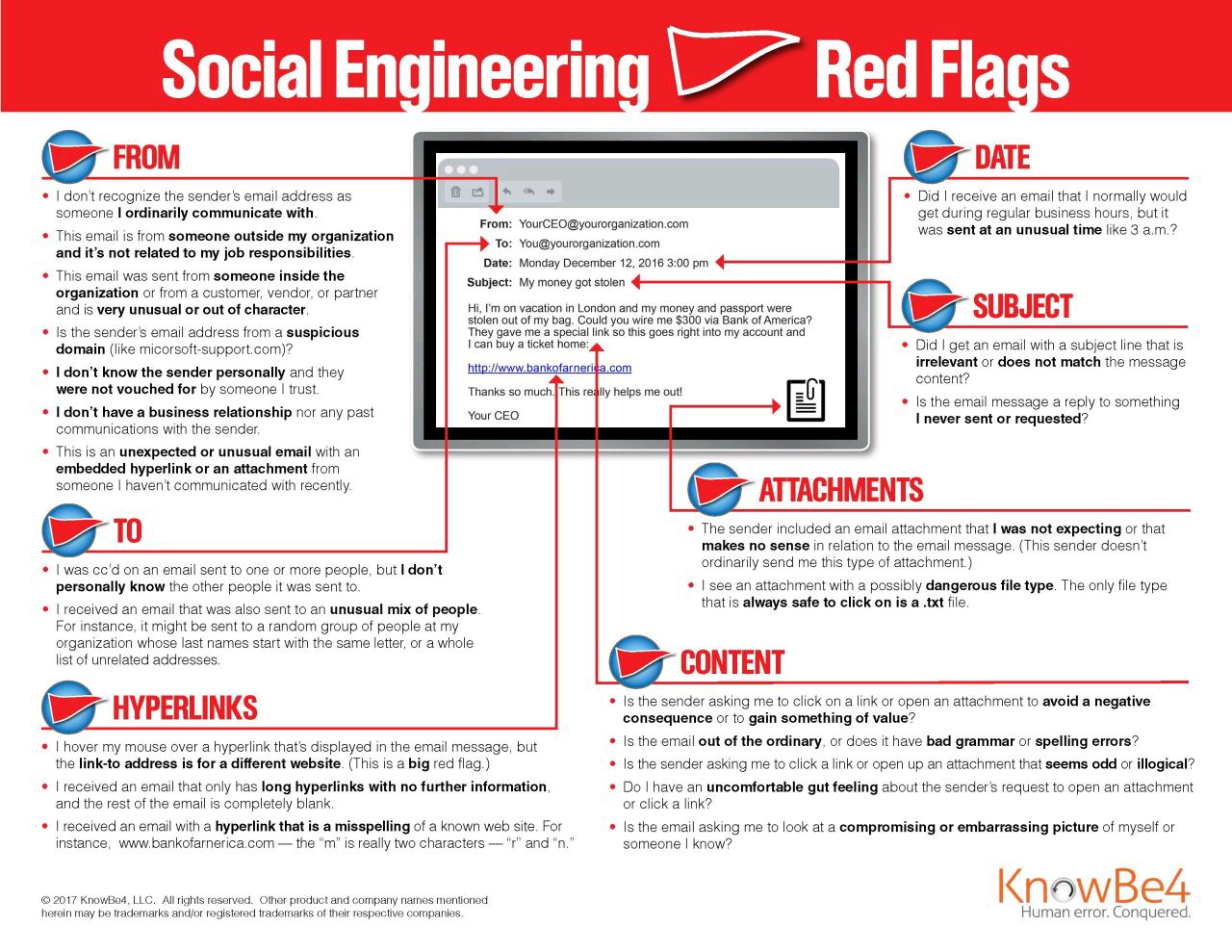
Indicator or Red Flags to look for investigation:


Email Sphere phishing: In this email fraud the perpetrator will ask for confidential and sensitive information. This type of attack resembles with e-mail spoofing fraud but in here in almost all cases the sender is someone trustworthy with an authoritative position in the organization.


Business email compromise is when criminals use email to abuse trust in business processes to scam organizations out of money or goods.


The Email forensic investigator can use several header fields to trace the email but it can be broadly categorized into the following area of interest the investigator should look into:

Sender's SMTP Server (OUTGOING Mail Server) >>

 Encrypted mail header >> 

Typical To, From, Subject, and Date Lines >> 

Mail transfer email client information >>

Various X-header information added by different SMTP server and email clients during the whole email sending process.


Mimikaz


What is Mimikatz?

If you’re into penetration testing and windows red teaming then you might have probably heard of mimikatz, but in case you’re wondering or have heard of the tool but don’t know what it does, let’s see what is mimikatz.

Written in C-language, Mimikatz is a very powerful post-exploitation tool and as described by CrowdStrike CTO and Co-Founder, “The AK-47 of Cyber Attacks.” 

Some even claim mimikatz to be a Swiss Army Knife of Windows Credentials. Benjamin Delpy, who is the developer of this tool, claims that he created this tool to play with Windows Security. He maintains his own GitHub repository where he has provided the source code for the tool and updates it on a regular basis.

What can be done using Mimikatz?

Although known widely for credential dumping, this is not the only thing that it can do. 

Mimikatz is also capable of assisting in lateral movements and privilege escalations. Attacks like Pass-the-Hash, Pass-the-Ticket, Over-Pass-the-Hash, Kerberoasting etc. can also be achieved with Mimikatz.

Mimikatz Attack Capabilities

Mimikatz has numerous modules that let attackers perform a variety of tasks on the target endpoint. Some of the more important attacks facilitated by the platform are:

  • Pass-the-Hash—obtains an NTLM hash used by Windows to deliver passwords. This allows attackers to reuse the password without having to crack the hash.

  • Pass-the-Ticket—Mimikatz was famously used to break the Kerberos protocol. It can obtain a Kerberos “ticket” for a user account and use it to login as that user on another computer.

  • Kerberos Golden Ticket—obtains the ticket for the hidden root account (KRBTGT) that encrypts all authentication tickets, granting domain admin access for any computer on the network.

  • Kerberos Silver Ticket—exploits Windows functionality that grants a user a ticket to access multiple services on the network (via the Ticket Granting Server or TGS). The Kerberos protocol may not check the TGS key, allowing attackers to reuse the key and impersonate the user on the network.

  • Pass the Key—obtains a unique key used by a user to authenticate to a domain controller. The attacker can reuse this key to impersonate the user.

Anatomy of a Mimikatz Attack:

Mimikatz abuses and exploits the Single Sign-On functionality of Windows Authentication that allows the user to authenticate himself only once in order to use various Windows services. 

After a user logs into Windows, a set of credentials is generated and stored in the Local Security Authority Subsystem Service (LSASS) in the memory. As the LSASS is loaded in memory, when invoked mimikatz loads its dynamic link library (dll) into the library from where it can extract the credential hashes and dumps them onto the attacking system, and might even give us cleartext passwords.


Malware analysis, Tools and technique


What is Malware Analysis?
Malware analysis is a process analyzing the samples of malware family such as Trojan, virus, rootkits, ransomware, spyware in an isolated environment to understanding the infection, type, purpose, functionality by applying the various methods based on its behavior to understanding the motivation and applying the appropriate mitigation by creating rules and signature to prevent the users.
 
Malware analysis plays an essential role in avoiding and understanding cyber attacks. When incident response teams are brought into an an incident involving malware, the team will typically gather and analyze one or more samples in order to better understand the attacker’s capabilities and to help guide their investigation.
 
Type of Malwares:

Type

What It Does

Real-World Example

Ransomware

disables victim's access to data until ransom is paid

RYUK

Fileless Malware

makes changes to files that are native to the OS

Astaroth

Spyware

collects user activity data without their knowledge

DarkHotel

Adware

serves unwanted advertisements

Fireball

Trojans

disguises itself as desirable code

Emotet

Worms

spreads through a network by replicating itself

Stuxnet

Rootkits

gives hackers remote control of a victim's device

Zacinlo

Keyloggers

monitors users' keystrokes

Olympic Vision

Bots

launches a broad flood of attacks

Echobot

Mobile Malware

infects mobile devices

Triada

 
How to perform Malware Analysis 
There are various types of analysis and related malware analysis tools that mainly used to break down the malware.
  • Static Malware Analysis
  • Dynamic Malware Analysis
  • Memory Forensics
  • Web Domain Analysis
  • Network interactions Analysis etc
Static Malware Analysis?
This procedure includes extraction and examination of different binary components and static behavioral inductions of an executable, for example, API headers, Referred DLLs, PE areas and all the more such assets without executing the samples.
Any deviation from the normal outcomes are recorded in the static investigation comes about and the decision given likewise. Static analysis is done without executing the malware whereas dynamic analysis was carried by executing the malware in a controlled environment.
 
1.Disassembly – Programs can be ported to new computer platforms, by compiling the source code in a different environment.
 
2.File Fingerprinting – network data loss prevention solutions for identifying and tracking data across a network
 
3.Virus Scanning -Virus scanning tools and instructions for malware & virus removal. Remove malware, viruses, spyware and other threats. ex: VirusTotal, Payload Security
 
4.Analyzing memory artifacts – During the time spent breaking down memory ancient rarities like[RAM dump, pagefile.sys, hiberfile.sys] the inspector can begin Identification of Rogue Process
 
5.Packer Detection – Packer Detection used to Detect packers, cryptors, Compilers, Packers Scrambler, Joiners, Installers.+ New Symbols+.
Static Malware analysis Tools
Ghidra and IDA : IDA Pro has been the go to SRE (Software Reverse Engineering) Suite for many years until Ghidra’s release in 2019. Since then Ghidra’s popularity has grown exponentially due to it being a free open-source tool that was developed and is still maintained by the NSA
 
Websites like : Hybrid-analysis, Virustotal.com
 
Other tools : Md5deep, PEiD, Exeinfo PE, RDG Packer,D4dot,PEview, WinDbg,Hxd
What is Dynamic Malware Analysis?
The dynamic analysis should always be an analyst’s first approach to discovering malware functionality. in dynamic analysis, will be building a virtual machine that will be used as a place to do malware analysis.
 
In addition, malware will be analyzed using malware sandbox and monitoring process of malware and analysis packets data made by malware.
Dynamic analysis tools: 
Some common Dynamic analysis are Wireshark, Netcat, Procmon, Process Explorer, Process Monitor,Regshot, ApateDNS Procmon, Procdot, Regshot, , Process Hacker, PeStudio, Fiddler, Wireshark, Cuckoo Sand box, Ghidra.
After you have gather some data its time for analysis:

  • Upload hash data/or file to site such virus total /anyrun / hybrid analysis to get info
  • If IP or domain name available, check DB of known Adversaries.
  • Use packet capture and traffic analysis, if external connection suspected by malware
  • Obtain the malicious file analyze in sandbox to identify indicators.
  • Use 'log s from SIEM and EDR to identify other infected endpoint.
  • Take the identified endpoint of the network, do not power off
  • Use data gathered to setup blocks for future attacks.

SIEM Rules from Event log ID and use cases


 Below are some guidance on rule creation and what event to look for:
Collection - Domain Controller - User Activity - Network Share Accessed
This rule looks for Windows Event ID 5140 which indicates that a network share has been accessed. When on Workstations or Domain controllers, this event can be used to identify access to C$ or Admin$. Common false positives will be IPC$, \Sysvol, \Netlogon.
 
Credential Access - AD - Account Lockout - Service Account
Event ID 4740
 
Defense Evasion - Domain Controller - System Change - Event Logs Cleared
Identifies the deletion of event logs from a windows host or domain controller. This may be performed to destroy evidence of malicious activity on a system.
Event ID 1102
 
Discovery - AD - Account Enumeration - Host
Event ID 4771, 4625,4768
 
Discovery - AD - Kerberoasting
This rule looks for activity on Active Directory indicative of Kerberoasting attacks. Kerberoasting is where an attacker cracks a Kerberos service ticket and rewrites them in order to gain access to a targeted service.
Event ID 4769
 
Execution - Network - Access Attempt - Unicode Domain
Identifies web requests where the website domain contains Unicode characters. Unicode allows the display of foreign characters within the URL bar and can be used to attempt to trick users to go to malicious websites.
URL is : *?xn--.*? Log source : web proxy Server and Firewalls
 
Exfiltration - Email - Auto Forwarding
This rule looks for many emails from a single internal user going to an external email address, indicative of a user forwarding their external mail content to a personal mailbox.
Vendor Msg id is : send , and status is: originating
 
Initial Access - ADFS - Excessive Login Failures
Identifies a large volume of ADFS failures, which may indicate account enumeration, brute-force login activity or a client misconfiguration.
Event ID 1201,1203,1205
 
Initial Access - Remote Access - Login Attempt - Different Geos
Identifies VPN login attempts by the same user across geographically distant locations in a short time period. This may indicate account compromise, especially if the user is not traveling.

 
Lateral Movement - Domain Controller - Login Attempt - Interactive
Identifies a remote interactive login to a domain controller.
Event ID 4624 and Session type is 10,2
 
Persistence - Domain Controller - System Change - Audit Policy Changed
Identifies system audit policy changes on windows hosts. This represents a change to the type of security events logged by the system and may be a pre-attack activity to avoid detection.
Event ID 4719,4905,4912
 
Persistence - Domain Controller - System Change - Domain Policy Changed
Event ID 4739
 
Persistence - Domain Controller - System Change - Multiple Processes Created
Identifies a large number of processes being created in a short time on a monitored windows host. The presence of an abnormal volume of abnormal processes may indicate the host has been compromised or is being misused.
Event ID 4688  Unique value>=10
 
Persistence - Domain Controller - System Change - Scheduled Task
Identifies the creation of new scheduled tasks as well as changes to existing tasks. The creation of new scheduled tasks or the removal of existing ones may be technique to maintain persistence.
Event ID:4698,4699,4700,4701,4702
 
Persistence - Domain Controller - System Change - Service Installed
Identifies the installation of unexpected services on a system. The installation of unexpected services may be an indicator of system compromise or misuse.
Event ID: 7045,4697,601
 
Privilege Escalation - AD - Group Change - Admin
Identifies attempts to change a user's group membership in AD. The high risk associated with delegating certain permissions in AD warrants a high level of scrutiny. For example, the promotion of a domain user to domain admin.
Event ID: 4728,4732,4746,4751,4756,4761
 
Privilege Escalation - ATP - Golden Ticket
This rule looks for Golden Ticket related activity identified by Azure ATP. See here for more details: https://docs.microsoft.com/en-us/azure-advanced-threat-protection/suspicious-activity-guide?tabs=external.
Event ID 2009,2013,2027,2032,2022
 
Hunting the Fileless Malware & Powershell Activities:
Event IDs (4104, 4103, and 4688)
 
  • Event ID 4103 – Module logging – Attackers uses several obfuscated commands and calls self-defined variables and system commands , Hunting these Event ID provides soc operations to record all the obfuscated commands as pipeline execution details under the event ID 4103.It should be enabled to process and get the malicious commands.
  • Event ID 4104 – Powershell Script Block Logging – Captures the entire scripts that are executed by remote machines. For Example Obfuscated scripts that are decoded and executed at the run time.This gives additional visibility on remote command.
  • If an event exceeds the maximum event log message size, script block logging will split the logged events into multiple events and Suspicious commands can be observed at the logging level of “warning”.
 
USE CASE: DNS QUERY Objective: The mission of this hunt is to drill down DNS logs to baseline common domains queried by endpoints in the environment as well as identify potentially infected endpoints by looking for possible DNS tunneling, domain generation algorithm (DGA) domains, and traffic to risky top-level domains (TLDs).
Log Source & Requirements: DNS query logging
Duration: 30 Days

Twitter Facebook Favorites More